Why Did My Real Photo Get Flagged as AI?
Recompression, screenshots, HDR and stripped EXIF all push real photos into detector false positives. Why it happens — and how to prove authenticity.
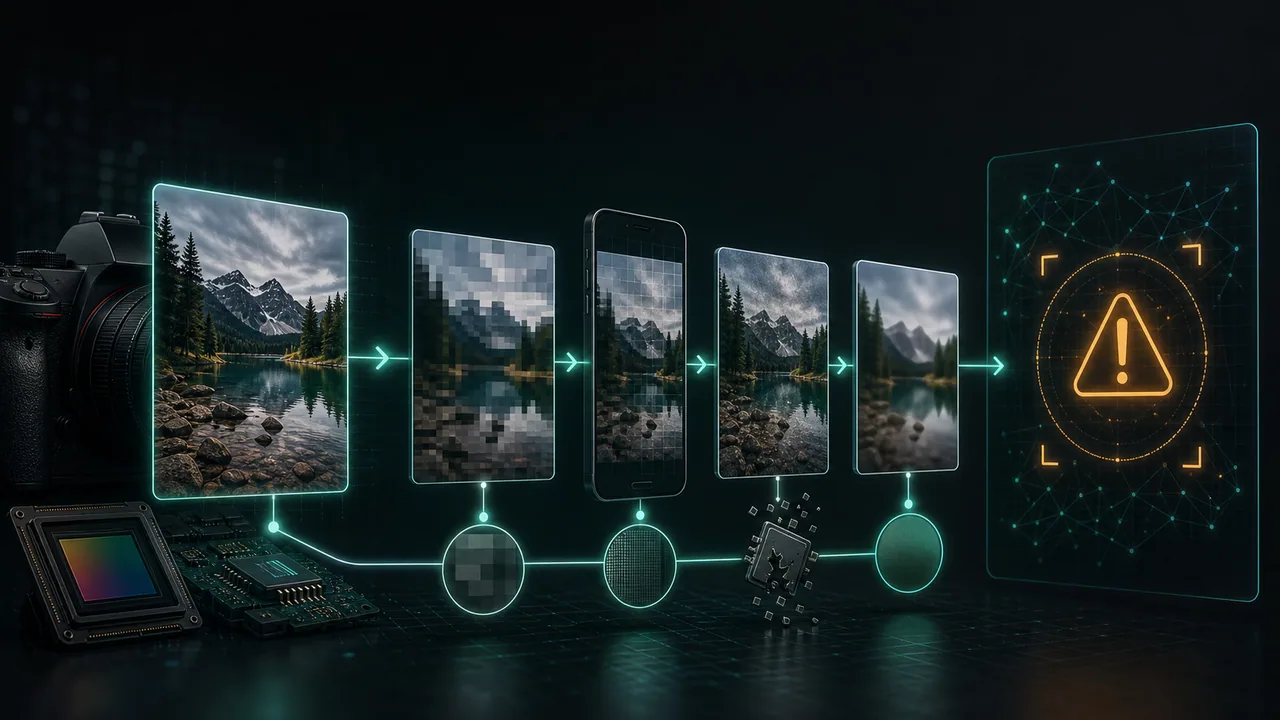
You shot the photo yourself. You were there. And yet an AI image detector just told you it was "likely AI-generated." It is a jarring, almost insulting result — and it is far more common than most people realize. The good news is that a false positive rarely means your camera is lying or that the detector is broken. It usually means the file you tested is no longer the file your camera produced.
Detectors do not have a memory of your afternoon. They infer authenticity from statistical fingerprints buried in the pixels and metadata. When those fingerprints get scrubbed, smoothed, or overwritten — by a messaging app, a screenshot, or your phone's own computational photography — the detector loses the very evidence that would have vouched for you. Here is exactly why that happens, and what to do about it.
What a detector is actually looking at#
An AI detector never sees "a real beach photo." It sees a grid of numbers and asks statistical questions: Does the sensor noise look like a physical camera or like a diffusion model's smooth output? Do the JPEG compression blocks line up naturally? Is there believable high-frequency detail, or has everything been averaged into a plausible-but-too-clean surface? Does the EXIF metadata match a real device and exposure?
Real cameras leave messy, physical traces — photon shot noise, lens imperfections, a sensor's unique PRNU pattern. Generative models tend to produce cleaner, more globally consistent statistics. The problem is that many everyday operations make a genuine photo look artificially clean too. That overlap is where false positives live. If you want the deeper mechanics, our guide on how AI image detectors work walks through each signal in detail.
Cause 1: Social-media recompression#
This is the number-one culprit. Every time an image passes through Instagram, WhatsApp, Facebook, or a group chat, it gets re-encoded and aggressively recompressed to save bandwidth. Each pass discards fine detail, rebuilds JPEG blocks, and blurs the delicate noise structure that proves a physical sensor was involved.
By the time a photo has been forwarded three times and downloaded from a chat, its original sensor noise is essentially gone — averaged away into soft, uniform gradients. To a detector, "no sensor noise plus clean gradients" reads a lot like "generated." The image is completely real; the proof of realness has been compressed out of existence.
Cause 2: Screenshots destroy everything useful#
Taking a screenshot of a photo feels harmless, but it is one of the most destructive things you can do to authenticity signals. A screenshot throws away all original EXIF metadata, re-renders the image through your display pipeline at screen resolution, and re-encodes it from scratch. The result is a brand-new file with none of the camera's fingerprints and a fresh, artificial compression history.
Worse, screenshots often capture the image after the platform already recompressed it — so you are stacking two rounds of damage. If you must preserve a photo's credibility, never send or test a screenshot of it.
Cause 3: Aggressive computational photography#
Modern phones do not simply record light. They run heavy on-device pipelines — multi-frame HDR, night mode stacking, AI-driven noise reduction, sky replacement, face smoothing, and machine-learning upscaling. These features exist to make photos look better, and they succeed. But in doing so, they mathematically reshape the image in ways that overlap with how generative models build pictures.
Night mode, for instance, merges many exposures and denoises hard, wiping out the random shot noise a detector expects from a physical sensor. AI upscaling literally invents plausible detail using a neural network — a process not far removed from generation. Your phone is, in a limited sense, partly synthesizing the final image. A detector picking up on that is not entirely wrong; it is just reaching the wrong conclusion about intent.
Cause 4: Stripped EXIF metadata#
EXIF metadata records the camera make and model, lens, exposure time, ISO, and timestamp. For a metadata-aware detector, intact and internally consistent EXIF is a strong vote for authenticity. Strip it, and you remove that vote entirely — leaving the detector to judge on pixels alone.
Metadata gets stripped constantly and often for good privacy reasons: social platforms remove it on upload, screenshots never carry it, and privacy tools deliberately erase it. That is a healthy default for protecting your location and device. But it also means a perfectly real, privacy-cleaned photo arrives at the detector with one of its best character witnesses missing. If you are managing EXIF deliberately, our EXIF remover lets you see and control exactly what metadata a file carries.
How to prove your photo is real#
You cannot force a detector to be right, but you can hand it the strongest possible evidence. The single most effective move is to test and share the original file, straight off the camera or phone, before any app has touched it.
- Use the untouched original. Export or transfer the source file directly (AirDrop, USB, or a cloud service that preserves originals) rather than saving a copy from a chat or feed.
- Never test a screenshot. If a screenshot is all you have, understand that its authenticity signals are already gone and no detector can recover them.
- Keep EXIF intact when authenticity matters. For proving a photo is real, leave the metadata on. Only strip it when privacy is the higher priority — and know it may cost you a benefit-of-the-doubt.
- Prefer standard photo modes for critical shots. If you anticipate a photo being scrutinized, a straightforward exposure will survive detection better than a heavily stacked night-mode or AI-upscaled frame.
- Read the per-signal breakdown, not just the headline. A good detector shows you which specific signals fired. That tells you whether the flag came from missing noise, absent EXIF, or compression artifacts — and often reveals a benign explanation.
Read the breakdown before you panic#
The most useful habit is refusing to treat a one-line verdict as the whole story. Our AI Image Detector surfaces a per-signal breakdown — sensor noise, compression history, high-frequency energy, metadata reliability, and more — so you can see precisely which signal pushed the score up. Nine times out of ten, a false positive on a real photo traces back to one obvious, fixable cause: a screenshot, a WhatsApp round-trip, or an aggressive night-mode capture.
It is also worth being honest about the state of the field: no detector is perfectly reliable, and every one of them produces both false positives and false negatives. Scores drift as models and detectors evolve, and results can differ between tools for the same image. For a broader picture of where the technology stands and how the major tools compare, see our 2026 AI detector landscape.
A flag on your genuine photo is not a character judgment. It is a signal that the file lost its fingerprints somewhere between the shutter and the upload. Find where that happened, go back to the original, and the story the pixels tell usually snaps back into focus.
Review method, sources and limits
- Reviewed by
- Tim Geithner · Founder and technical reviewer
- Last reviewed
- July 1, 2026
We compare current primary documentation with the implemented browser data flow and, where stated in the article, repeatable hands-on observations. A detector score is not proof of authorship or provenance. No controlled benchmark is claimed unless the article names its sample, tested version, date and method; third-party products and policies can change.
Primary references
SynthGuard.net — privacy-first tools
Humanize AI media locally and choose a clearly disclosed text mode.
Images, video and detector scans stay on your device. Light-mode text is local; deeper text modes use the protected inference route. No detector outcome is guaranteed.
All third-party names, logos and trademarks (e.g. Hive, Optic, Sensity, Sightengine, Illuminarty, GPTZero, Instagram, TikTok, OnlyFans, Fanvue, SynthID, C2PA) are the property of their respective owners. SynthGuard is an independent service and is not affiliated with, endorsed by, sponsored by, or partnered with any of these companies or platforms. Detector and platform names are used solely for descriptive comparison under § 6 UWG / Art. 4 Directive 2006/114/EC.
Frequently asked questions
Glossary terms in this article
Keep reading
How AI Image Detectors Actually Work
AI image detectors look magical from the outside — drop an image, get a percentage, ship the verdict. Inside, they are an assembly of brittle statistical signals stacked on top of each other, each ca…
The AI Detector Landscape in 2026
The detector market in 2026 looks nothing like the detector market in 2023. Three years ago, "AI detection" meant a single confidence score from a single model. Today it means a fragmented ecosystem…
Hidden Characters in AI Text: What Claude, ChatGPT and Gemini Actually Embed
Turn on "show invisible characters" in your editor, paste in a few paragraphs you copied out of a chat window, and there is a decent chance something lights up that you did not type. A dot between tw…